Raster Images
Images
Raster images
An image is a distribution of light on a 2D canvas.
A raster image captures an image in a grid, i.e. with pixels.
Raster devices
- input
- 2d array sensors
- e.g. scanners, cameras
- use bayer filters to convert input light into pixels
- output
- printers
- displays can be
- emissive, emitting light by themselves (e.g. LED)
- transmissive, allowing only certain light to be transmitted (e.g. LCD)
- display images as arrays of pixels
Other representations
Another common representation of images is vectors, i.e. a mathematical description of the image rather than a grid of pixels.
Images as functions
An image can be abstractly thought of as a function $I : \R^2 \to \R^n$, where each entry of the output vector specifies some quantity. For example, a typical picture is a function from $\R^2$ to $\R^3$, where $I(x, y) = (r, g, b)$ specifying red, green, blue pixel values.
Raster image representation
Colour specification
An RGB colour can be specified in multiple ways:
- straightforward RGB values, using red, green, blue, the primary colours of light
- CMYK which uses cyan, magenta, yellow, the complementary colours
- HSV - hue, saturation, value, which is much more intuitive for humans
- HSL - similar to HSV
Discretization
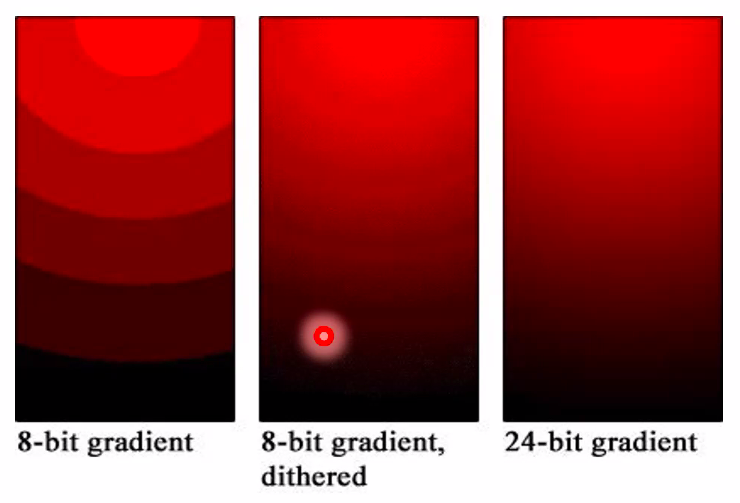
Continuous maps cannot be represented as pixels, so discretization is needed when we want to represent something that is continuous in reality.
Discretization of colours can leave artifacts such as banding
Gamma correction
On all devices, display intensity is not linear with respect to input intensity
Transparency
Transparency is represented by a fourth coordinate in each pixel, i.e. RGB becomes RGBA
The last channel is the alpha channel, which specifies how visible the pixel is.
Once transparency is defined, we can define compositing and blending.
[…]